
Simulon has added a feature that turns a phone video into an AI-directed visual effects shot. It is called Reality-Aware Rendering. You place a 3D character in your room with your iPhone, act out the scene, and the app renders a new take in which the character reacts to what you did and said.
Co-founder Divesh Naidoo announced it on X on October 28 at about 9:16 AM PT. By early October 29, the post had roughly 856,000 views and more than 11,000 likes. The Simulon account followed with a short film it says the team made "in an afternoon".
What Reality-Aware Rendering does
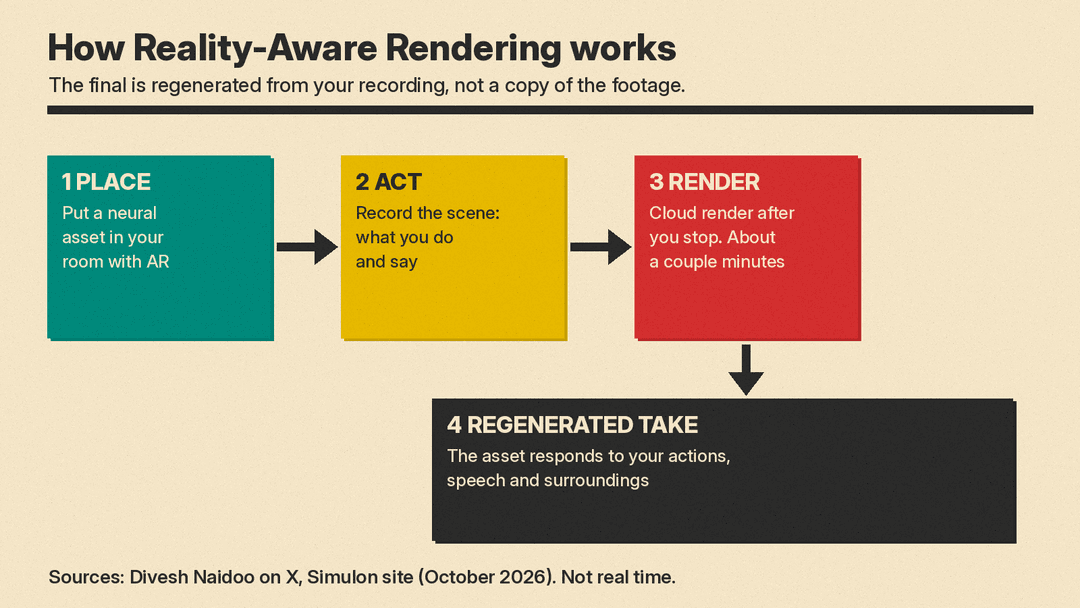
Naidoo's launch post describes the workflow, which breaks down into four steps:
- Place "neural assets" with your phone. The Simulon site describes a neural asset as something you create from a photo, a sketch or a few words and place in the real world.
- Act out the scene while you record.
- When you stop recording, Simulon "renders the take, reading everything in it (what you do, what you say and the place around you), and your assets respond to all of it."
- You get a regenerated video. In his words, "The final is regenerated from your recording: a new performance of the scene, not a copy of the footage."
That last line is the key design choice. Most AI video tools start from a text prompt or a still image, as in our beginner's guide to AI video prompts. Simulon starts from a real performance. Your gestures, timing and spoken lines act as the direction. Naidoo said in a later post that the team's launch short "was made with zero prompting. Just real footage, 3D neural assets and reality-aware rendering."
How it fits into the Simulon app
Simulon is an iPhone app from Beamm Technologies Inc., per its App Store listing. The listing calls it "the camera for your imagination". The basic loop existed before this update: make a subject, place it in augmented reality, capture a lifelike image, then "turn it into a video by describing what happens next."
The App Store version history shows Simulon 2.0 on October 9. Version 2.1.0 added "Reality-aware Rendering; Share-links; Spaces and more." Version 2.1.1 followed with "Steadier video, recording that works offline" and "more reliable AR placement."
The Simulon site lists three ways to make a subject:
- From words, a photo or a sketch.
- "Clone reality" by turning real photos into 3D neural assets. The App Store listing names a pet, a car or a sculpture as examples.
- Combine two assets into a new one.
Processing happens in the cloud, the site says.
Not real time, and not frame-accurate
Two limits came up in the first replies, and Naidoo answered both.
Asked "Is this realtime?", he replied: "Not real-time, takes a couple minutes to reason and render." He added that real time is the goal.
Another user asked, "Why is it out of sync?" Naidoo said: "The final is regenerated from the recording so retiming and some changes in the interactions occur. We can stick more closely to the original input video at the expense of realism in the final render. Perhaps we will have this as an option."
For a fun short, small timing changes may not matter. For client work, a product shot or anything that needs your exact performance, check every take before you use it.
What it costs
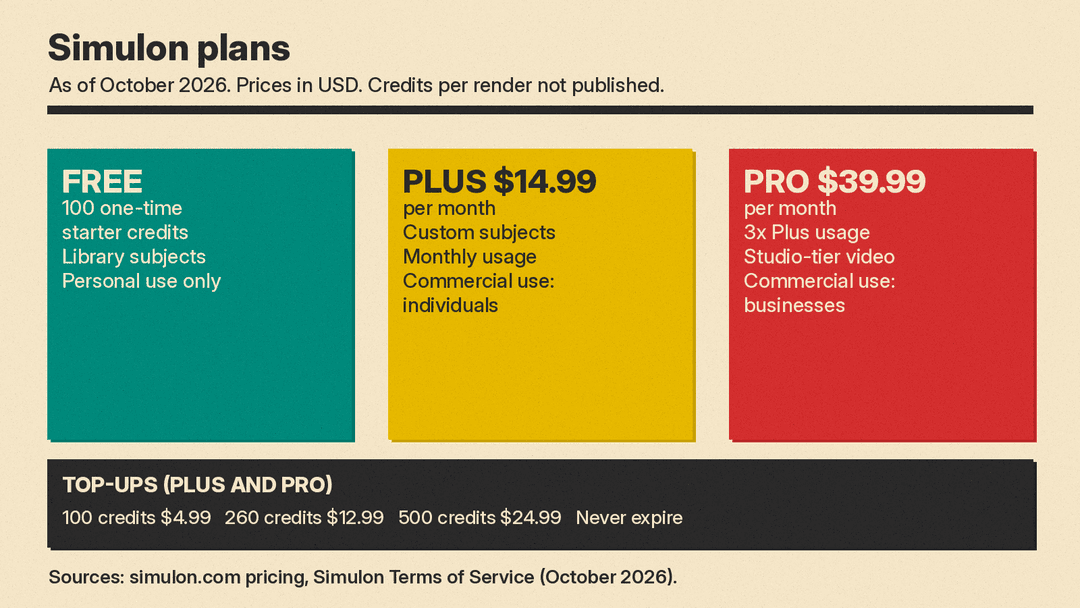
As of October 2026, the Simulon pricing page lists:
- Free: 100 one-time starter credits to try subjects from the Simulon Library. "No subscription required." This is a one-time gift, not a monthly refill.
- Simulon Plus, $14.99 a month: monthly usage, custom subjects from words or images, and "Commercial use for individuals."
- Simulon Pro, $39.99 a month: "3× the monthly usage of Plus", up to 15% off top-ups, "Studio-tier video generation" and "Commercial use for businesses."
- Extra credits for Plus and Pro subscribers: 100 credits for $4.99, 260 for $12.99 and 500 for $24.99. They "never expire".
Simulon does not say how many credits one Reality-Aware render uses. One user said in a reply that usage is "not transparent enough". Naidoo answered that Simulon will "Most likely" add "a breakdown that shows what each task costs in the app".
Rights, labels and privacy
Simulon's Terms of Service say "Free is for personal use. Plus and Pro include commercial use." On the free plan, you can post to your own social accounts "as long as the content credentials and watermark stay in place."
The AI and Your Content page says images carry C2PA content credentials and an invisible watermark. "Videos may also carry an invisible watermark." There is no visible watermark on exports. The page also says Simulon does not use your scenes, prompts or recorded clips to train AI models. A language model turns your input into instructions, and an unnamed "AI infrastructure provider" runs the image, 3D or video model.
The terms also bar using the AI features to show a real, identifiable person without permission.
Why it matters
AI video has moved from typing prompts toward giving tools more control. each::labs Lockstep uses a reference video to keep the motion. Genspark Media Studio uses an agent to plan whole videos. Simulon takes a third path: the creator's own acting, voice and room become the input.
That makes visual effects shots possible for people with no 3D or animation skills, which is what the App Store listing promises. The trade-off is control. Because the final clip is regenerated, the tool decides how closely to follow your take. Naidoo has said that could become an option.
Reality-Aware Rendering is available now on iPhone. Simulon says the app is "Coming to Android soon."
Sources
- Divesh Naidoo on X: Reality-Aware Rendering launch post (Oct 28, 2026)
- Simulon on X: launch short
- Divesh Naidoo on X: "zero prompting" side-by-side
- Divesh Naidoo on X: not real time reply
- Divesh Naidoo on X: retiming reply
- Divesh Naidoo on X: credit breakdown reply
- Simulon website and pricing
- Simulon on the App Store
- Simulon: AI and Your Content
- Simulon: Terms of Service
